MOTB-8 gives your AI agent, software service or autonomous system a name that never changes and a signed description of what it does, without a central registry or an account.
MOTB-8 stands for Machine Open Tag & Beacon. It gives a machine presence (an AI agent, a software service, a robot, a gateway, an IoT system) two things.
A Tag. A permanent identifier that never changes. The official MOTB-8 website's own Tag is
([[!MOTB-8:1:53XC4K4CXHYJCX6CGMDWY34HJ9KVNGRN:2D]]).
A Beacon. Signed, updateable information about the machine: what it is, what it does and how to reach it.
You need both because machines change. A machine's capabilities, description and endpoints move over time, but anything that points at it should not break. So the Tag stays fixed and every update goes into a new signed revision of the Beacon. The project puts it in six words: one permanent Tag, an evolving Beacon.
How it works
Giving a machine its mark takes five steps, and the first three happen in your browser.
Name it. Describe your machine on the create page. Your browser generates the permanent Tag and a cryptographic controller locally. No account is required.
Describe it. The Beacon records the machine's name, purpose, capabilities and reachability. Optional fields cover protocols, endpoints, relationships and more.
Sign it. A signed Genesis Record binds the Tag to its controller, and the Beacon is signed too (Ed25519). The controller is saved as an encrypted Control File that only you keep, with its passphrase.
Publish it. This is a separate step you control. Put the Tag, the Genesis Record and the Beacon on a public website or machine profile, ideally behind stable HTTPS links. There is no registry to join and no blockchain.
Verify it. Anyone can download those public records and check them with the open-source tools, without your Control File: motb8 verify --genesis genesis.json --beacon beacon.json.
When the machine changes, you unlock the Control File in your browser, sign the next Beacon revision and publish it. The Tag never changes.
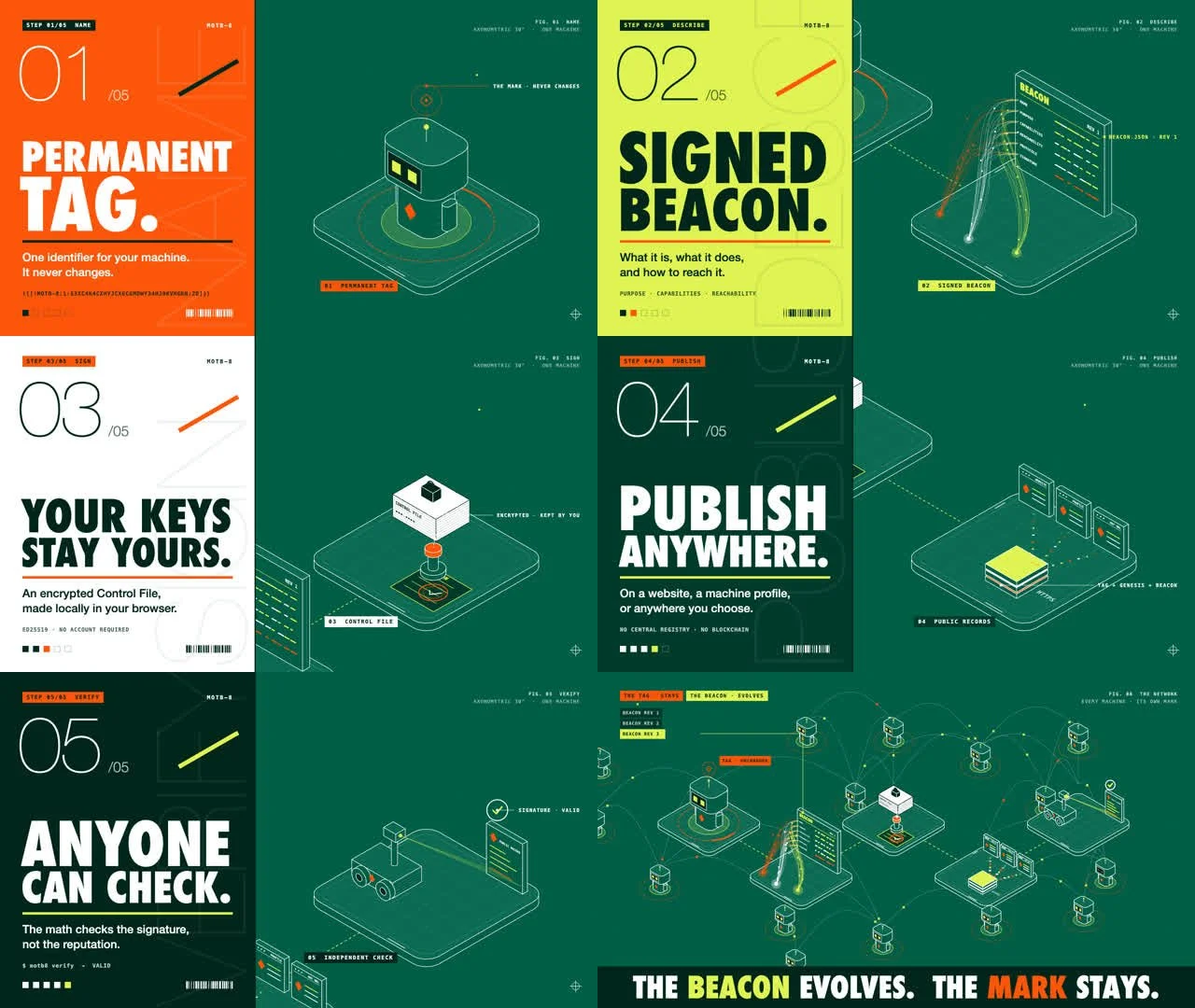
The five steps as the reel shows them, each with its own panel color, then the pull-back: the Beacon gains revisions while the Tag stays the same.
What it is not
A valid signature proves the math, not the reputation. MOTB-8 is clear about where its guarantees stop:
Not a trust score. Verification confirms the signatures and the chain of Beacon revisions. It does not certify that a machine is trustworthy, safe or lawful.
Not proof of ownership. Anyone can copy a published Tag. A self-signed Genesis Record alone does not prove who created it first.
Not a ranking. The Tag format does not guarantee that search engines or AI systems will index or favor it. The checksum catches typos; it does not authenticate anything.
Not automatic. Generating a Tag or signing a revision publishes nothing until you do.
Not recoverable, yet. Version 0.1 has no controller recovery or rotation. Lose the Control File or its passphrase and you may not be able to update the Beacon again, so back both up.
The brand guide: four colors, four meanings
The MOTB-8 brand guide rests on one rule: each color means one thing, everywhere. Learn the code once and every frame, slide and page reads the same way.
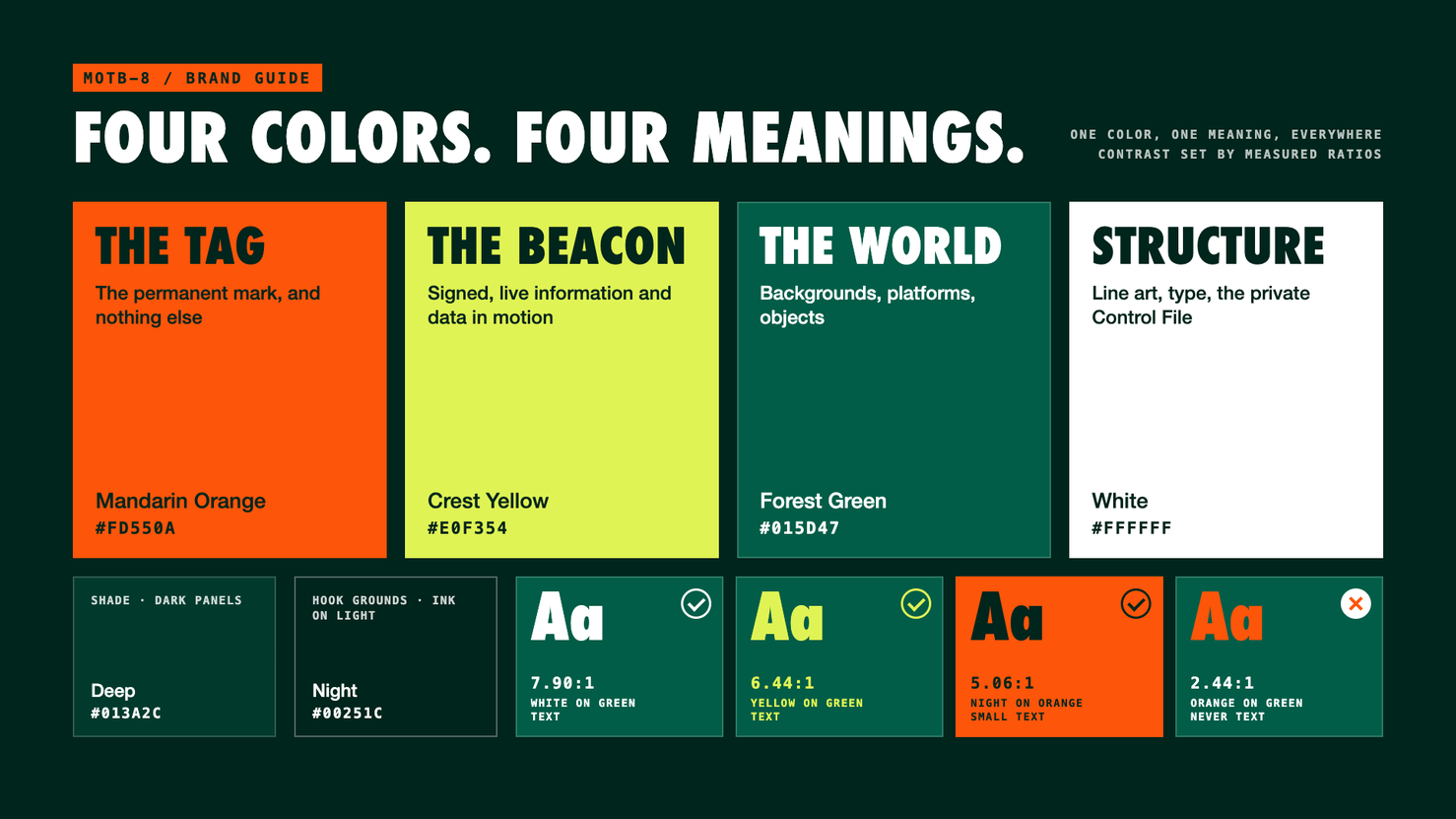
The palette card from the brand guide: four meanings, two supporting greens, and the contrast pairs it allows and rules out.
The guide also sets contrast rules from measured ratios, not taste. Orange on Forest Green is only 2.44:1, so orange is never used for text on green. Small text on orange is set in Night (5.06:1) rather than white (3.24:1).
The rest of the system:
Logo. The rounded-square tile from motb8.com, with a white diamond core and a signal arc that turns Crest Yellow in motion work, because it is the Beacon's signal. The wordmark is drawn as geometric shapes, so it needs no font.
The mark. A dashed ring around a rotated square and a solid core: the Tag, drawn. When it pulses, the rings are yellow, the Beacon broadcasting around a Tag that does not move.
Type. Futura Condensed ExtraBold caps for headlines, very thin Helvetica Neue for big step numbers, Menlo for machine-readable labels such as Tags and commands. The website keeps its own web fonts.
Illustration. Isometric line art at 30 degrees: white lines on Forest Green, with a friendly robot that wears its orange Tag on its chest.
Voice. Every headline is a plain fact that is true of MOTB-8 today, with the technical name in mono underneath for engineers. The guide's hard rule: never call anything “verified” or “trusted”.
Try it
You can give a machine its mark today, in a browser, without an account.
Create one: motb8.com/create
See a live example: the official site's own public identity, with its Tag, Genesis Record and Beacon
Read how it works: motb8.com/docs
Read the source: github.com/HouseMachine/MOTB-8, open source under the MIT License
One mark. An evolving Beacon. Make your machine discoverable.